Photographers
A photographer balances exposure, removes distractions, corrects color, and prepares a polished image for print or digital publishing.
The layered workflow makes it easier to compare versions and revisit a correction later.
Plain-language definition
What is image editor in Photoshop? It is the collection of tools, panels, and document controls used to change a raster image. Photoshop combines pixel editing, layer-based composition, color adjustments, retouching, typography, and export in one workspace.
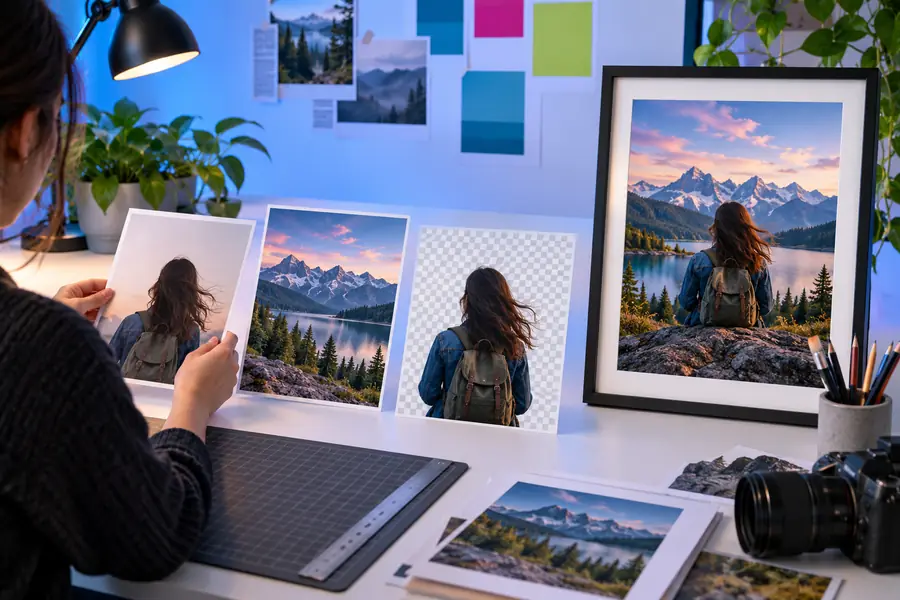
Photoshop treats an image as a document that can contain pixels, layers, selections, masks, text, and adjustment instructions. A typical edit moves from source preparation to controlled changes and a final output.
Import a photograph or graphic, check its dimensions and color mode, then review the layer structure before changing pixels.
Use selections, masks, brushes, transformations, filters, and adjustment layers to alter specific parts while preserving a workable history.
Compare the result with the source, correct visible problems, save an editable version, and export a copy suited to its destination.
Photoshop is a deep image editor, but it is not every kind of creative software. The comparison below separates common strengths from tasks that need another tool or a different workflow.
| Photoshop image editor | Basic image editor | |
|---|---|---|
| Layered composition | Supports many editable layers, groups, masks, and blend modes. | Often focuses on direct edits to a single flattened image. |
| Precise selections | Provides detailed selection, path, channel, and masking workflows. | Usually offers simpler crop, lasso, or automatic selection controls. |
| Color correction | Includes targeted adjustments for tone, color, contrast, and channel behavior. | Typically limits changes to a smaller set of global sliders. |
| Retouching | Handles healing, cloning, cleanup, reshaping, and pixel-level corrections. | May cover basic blemish removal but with fewer ways to refine results. |
| Vector page layout | Can place text and shapes, but it is primarily a raster editing environment. | May be even less suitable for precise multi-page or production layout. |
| Video, 3D, and animation | Some projects can include motion or specialized content, but Photoshop is not a complete video or 3D production suite. | Usually stays focused on still-image adjustments. |
| Reusable editability | A layered document can preserve decisions for later revision. | Flattened output may make future changes slower or destructive. |
These bit-depth options are real Photoshop concepts rather than performance promises. They describe how much tonal information a document can store per color channel and help explain why project settings matter.
Different people rely on the image editor for different kinds of control. The common thread is a need to change visual information deliberately rather than only apply a one-click effect.
A photographer balances exposure, removes distractions, corrects color, and prepares a polished image for print or digital publishing.
The layered workflow makes it easier to compare versions and revisit a correction later.
A designer combines photography, typography, shapes, and visual references into a social graphic, campaign asset, or presentation image.
Separate layers allow composition changes without rebuilding the entire design.
A retoucher works carefully on skin, product surfaces, backgrounds, or small distractions while trying to preserve believable texture.
Masks, selections, and healing tools provide more control than a single global filter.
A marketing specialist adapts one source image into several campaign sizes, adds text, and creates consistent visual variations.
An organized document makes repeated edits and approval changes easier to manage.
A learner practices cropping, layers, selections, and adjustment controls while building a mental model of non-destructive editing.
A structured sequence turns a complex image editor into a set of understandable editing decisions.
Photoshop is useful when you need detailed control, layered files, and room to refine a visual over time. If your task is simpler, a focused image editor may be easier to understand and quicker to use. Start with the kind of change you need, then choose the workflow that keeps that change clear and reversible.
It refers to the set of Photoshop tools and document controls used to modify images. These include layers, selections, masks, brushes, adjustments, retouching tools, text, transformations, and export options.
Photoshop is primarily a raster image editor, meaning it is designed to work with pixel-based images. It also supports text, shapes, and compositing, so people use it for many design tasks even though it is not a complete page-layout or vector-design application.
You can crop and resize images, correct color and exposure, remove or repair areas, combine multiple sources, add text, isolate subjects, and prepare files for different destinations. Its layer and mask system also lets you revise many changes without permanently altering the original pixels.
A basic image editor usually emphasizes quick crops, filters, resizing, and simple corrections. Photoshop offers a deeper image editor workflow with layered documents, precise selections, masks, adjustment controls, and more options for refining complex compositions.
No. Beginners can start with a simpler image editor when their needs are limited to cropping, resizing, light color changes, or quick cleanup. Photoshop becomes more useful when a learner wants to understand layers, controlled retouching, compositing, and repeatable revisions.